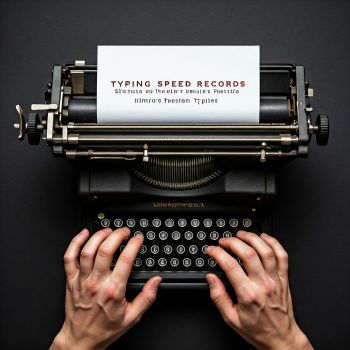
Fast Typer
 Mortal Kombat
 Space Waves 3D
 Cut The Rope
 Dumb Ways To Die
 fortune cookie
 Santa Tracker
 Parkour Block 4
 Geometry Dash Meltdown
 Parkour Block 2
 Parkour Block 3
 Parkour Block Xmas Special
 Parkour Craft
 Slope
Slope
 Run 3
Run 3
 Parkour GO
 Minecraft Endless Runner
 Vector Rush
 Fall Guys And Girls Knockdown
 Temple Run 2
 Zombie Tsunami
 Geometry Dash Lite
 Money Land
 Fireboy And Watergirl 1 Forest Temple
 Ball Rush
 X-Parkour
 Stickman Parkour
 Death Run 3D
 Geometry Dash Bloodbath
 Motorbike Simulator
 Super Mario Minecraft Runner
 Vex 3
Vex 3
 Vex 4
Vex 4
 Snake Game
 Backflip Dive 3D
 Traffic Jam 3D
 Impostor
 Racing Horizon
 Apple Worm
 Pixel Force
 Parkour: Climb And Jump
 Vex 7
Vex 7
 Bounce Ball
 Vex 5
Vex 5
 Slope Extra
 Hot Dog Bush
 Safe The Panda
 Penguin Diner
 Merge Blast
 Red Ball Bounce
 Connect Master - Classic Game
 Electron Dash
 Catch The Impostor
 Risky Train Crossing
 Fishing 3 Online
 Grindcraft
 Extreme Drift Car Simulator
 Going Balls
 Dead Zed (No Blood)
 Stack
Stack
 The Mergest Kingdom
 Red Stickman: Fighting Stick
 Novice Fisherman
 Rider Online
 Worm Hunt - Snake Game IO Zone
 Parking Fury 1
 Super RunCraft
 Stickman Vector
 RX7 Drift 3D
 Two Punk Racing
 Parking Fury 3
 Stick Duel: Medieval Wars
 Traffic Tour
 Survival 456 But It Imposter
 Age Of War
 Endless Siege
 Supra Drift 3D
 Gun Night.io
 Cuphead
 Coach Bus Simulator
 The Last Survivors
 CS Online
 Parking Fury 2
 Shell Shockers
 PUBG Pixel
 Diggy
Diggy
 Imposter Expansion Wars
 Jump On 2
 Draw Defense
 City Stunts
 Ninja Cut
 Garden Tales 3
 8 Ball Pool Challenge
 Mine Clone 4
 Basket Random
 Shaun The Sheep Sheep Stack
 Merge Cannon: Chicken Defense
 Moto Road Rash 3D
 Moto X3M 4: Winner
 Graffiti Time
 PUBG Pixel 2
 Moto X3M Pool Party
 Noob Vs 1000 Zombies!
 KnifeBlades.io
 Candy Riddles: Free Match 3 Puzzle
 State.io - Conquer The World
 Ado Stunt Cars
Fast Typer – A Quick Overview for New Players
Fast Typer is an online typing challenge that invites players to test and improve their keyboard speed. The game is designed for anyone who wants to sharpen their typing skills while enjoying a competitive environment. Whether you are a casual gamer looking for a short burst of fun or a dedicated typist aiming to beat personal records, Fast Typer offers a straightforward yet engaging experience.
What Makes Fast Typer Appealing
The core attraction of Fast Typer lies in its simplicity. The game presents words or short phrases that appear on the screen and requires the player to type them accurately as quickly as possible. Each correct entry adds to the score, while mistakes may reduce momentum. This clear cause and effect loop creates a satisfying sense of progress and encourages repeated play.
Because the game runs directly in a web browser, there is no need for complex installations or heavy hardware. Players can jump in from a desktop computer, laptop, or even a compatible tablet with a physical keyboard. The accessibility of Fast Typer makes it a popular choice for quick practice sessions during breaks or for longer focused training periods.
Key Elements That Keep Players Coming Back
- Instant feedback on typing accuracy and speed.
- Progress tracking that highlights improvement over time.
- Increasing difficulty that challenges even seasoned typists.
- A clean visual layout that minimizes distractions.
Practical Guidance for Getting Started
Although the game does not provide a detailed control guide, the basic interaction is intuitive. Players should position their hands on the home row keys and focus on maintaining a steady rhythm. Here are some practical tips to help you get the most out of Fast Typer:
Maintain Proper Hand Placement
Start with your fingers on the home row keys – the central row where the index fingers rest on the F and J keys. This position allows you to reach all other keys with minimal movement, reducing strain and increasing speed.
Focus on Accuracy Before Speed
It is tempting to type as fast as possible, but errors can interrupt the flow and lower the overall score. Concentrate on hitting each letter correctly, and the speed will naturally increase as you become more comfortable.
Practice Consistently
Regular short sessions are more effective than occasional long marathons. Aim for a few minutes each day to build muscle memory and reinforce proper typing habits.
Use a Comfortable Keyboard
A keyboard with responsive keys and a comfortable layout can make a noticeable difference. If you find the default keyboard on your device uncomfortable, consider using an external keyboard that suits your hand size and typing style.
How Fast Typer Fits Into the Typing Game Landscape
Fast Typer belongs to a genre of web based typing games that blend skill development with entertainment. Similar titles often feature racing themes, word puzzles, or timed challenges. What sets Fast Typer apart is its focus on pure typing speed without additional gameplay layers. This makes it an ideal tool for players who want a pure typing workout without extra distractions.
Because the game tracks performance over multiple sessions, it can serve as a personal benchmark. Players can compare their scores with previous attempts, observe trends, and set realistic goals for improvement. This self‑reflection aspect adds depth to what might otherwise be a simple reflex test.
Frequently Asked Questions About Fast Typer
Is Fast Typer suitable for beginners?
Yes the game is designed to be accessible for players of all skill levels. Beginners can start at a comfortable pace and gradually increase difficulty as they improve.
Can I track my progress over time?
The game provides a score display after each round, allowing you to see how many words you typed correctly and how fast you were. By noting these numbers you can monitor your development.
Do I need an internet connection to play?
Fast Typer runs in a web browser, so an internet connection is required to load the game initially. Once the game is loaded, a stable connection ensures that scores are recorded correctly.
Is there a way to compete with other players?
The game focuses on personal performance rather than direct multiplayer competition. However, you can share your scores with friends or on social platforms to create informal challenges.
What equipment do I need to play?
A standard keyboard and a device capable of running a modern web browser are sufficient. No special peripherals or software installations are necessary.
Fast Typer offers a clean and effective way to improve typing speed while enjoying a competitive edge. By following the practical tips above and committing to regular practice, players can see measurable improvements and enjoy the satisfaction of watching their scores climb. Whether you are new to typing games or a seasoned veteran, Fast Typer provides a rewarding experience that fits easily into any gaming routine.